
 Home
Home PC
PC PlayStation
 Xbox
Xbox Nintendo Switch
 Mobile
 Esports
 Anime and Manga

Many Mobile Legends players often seek information on how to delete their MLBB accounts, driven by various reasons. It’s beneficial to understand this process, even if you don’t plan to delete your account immediately. Additionally, for those who wish to retain their MLBB account but start anew, unlinking social media accounts is an available option.
Here’s a comprehensive guide on both deleting (or more accurately, canceling) your ML account and unlinking social media handles.
Canceling Your Mobile Legends Account: A Step-by-Step Guide
While it’s not possible to permanently delete your ML account, Moonton allows account cancellation, rendering it inaccessible but still visible to friends.
To cancel your ML account, follow these steps:
- Launch Mobile Legends on your device.
- Click on your profile icon in the top left corner of the main menu.
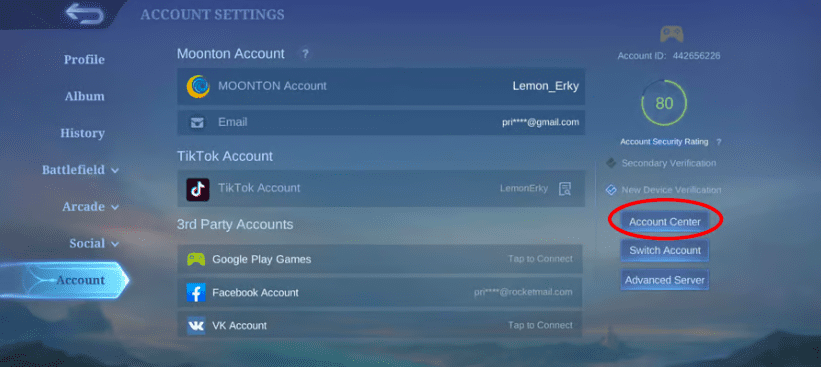
- Access the “Account” section in the settings.
- Select “Account Center” to manage security information.
- Choose the “Cancel Account” option.
- A browser window will open for confirmation.
- Acknowledge the conditions for account cancellation by scrolling and selecting the relevant option.
- Proceed with the cancellation by tapping “Next.”
- Post-cancellation, you’ll be logged out and unable to access your account. Any attempt to log in will redirect you to the account creation page.
Remember, your account will still appear to friends but will be permanently offline and irrecoverable.
Unlinking Your Social Media Accounts from MLBB
If you prefer not to cancel your account, unlinking social media handles is an alternative. Here’s how:
- Open Mobile Legends on your device.
- Click on your profile icon in the top left corner of the main menu.
- Go to the “Account” tab in the settings.
- Select “Account Center” for security management.
- Choose “Disconnect 3rd Party Account.”
- Unbind your preferred social media account(s) from the provided list (Google Play, VK Account, Facebook, TikTok).
After unlinking, you can still access your ML account via email or Moonton account, but not through the unlinked social media platforms.
For the latest gaming Guides, Updates and News, don’t forget to visit our dedicated gaming page. GAMING GUIDES Stay informed and level up your gaming experience with our fresh content!




