
 Home
Home PC
PC PlayStation
 Xbox
Xbox Nintendo Switch
 Mobile
 Esports
 Anime and Manga

Unlock more buildings and expand your city in SteamWorld Build by growing your worker population. Here’s how to do it efficiently.

Embark on your city-building journey within the SteamWorld universe in SteamWorld Build. As you pave your way through the game, unlocking a myriad of buildings, decorations, and activities becomes a key part of your experience. However, mastering the basics and significantly expanding your city’s size becomes a critical early goal.
To upscale your city and gain access to a variety of buildings, players must focus on increasing their worker population. Use this guide as a comprehensive walkthrough to construct residential structures and increase worker count in your SteamWorld Build metropolis.
How to Increase Worker Population

Expanding your city’s worker population serves as a gateway to unlocking various buildings, creating new worker types, and generating revenue through taxes. In SteamWorld Build, increasing the number of workers hinges on constructing residential buildings, aptly named Worker Residentials.
How to Build Worker Residentials
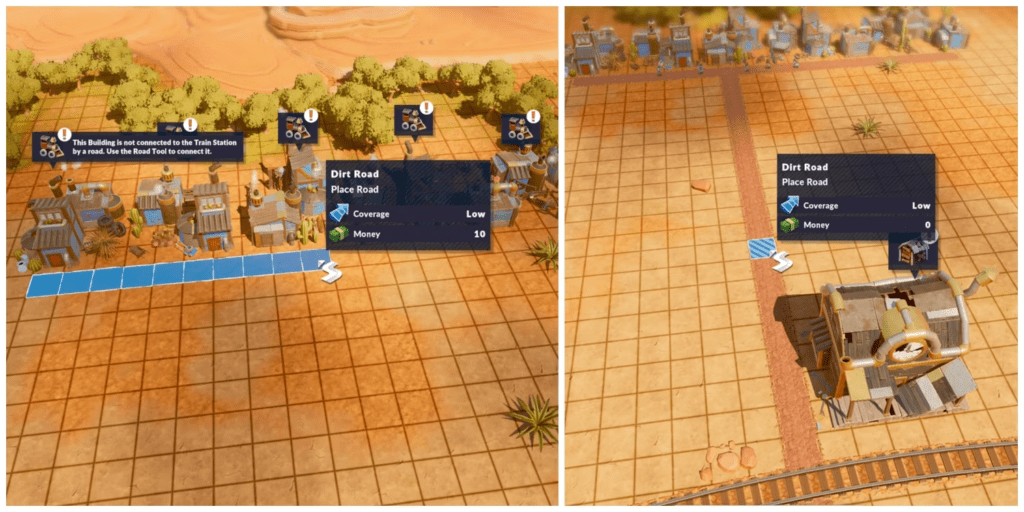
Worker Residentials act as abodes for your city’s workforce. Players can initiate the construction of Residentials by accessing the Build menu and selecting the Worker icon. Once chosen, these structures can be strategically placed within the cityscape.
While Residentials can be erected almost anywhere, workers will only inhabit these spaces if they are connected to the Train Station. Establishing a road network that links these buildings to the Train Station is crucial for workers to move in and start populating the area.
Each Worker Residential in SteamWorld Build can house up to ten workers. To keep growing the population and achieving milestones, continuous construction of more Worker Residentials is necessary. Additionally, as milestones are reached, workers’ requirements may shift, demanding players’ attention to ensure their needs are met.
Read This Also: New Trailer announces December 1st Release Date for SteamWorld Build
Influence of Other Buildings

Certain structures like Warehouses, General Stores, and Repair Shops impact houses within a specific radius. Only workers residing in Residentials within this range benefit from the services provided by these buildings.
When placing such structures, SteamWorld Build highlights the Residentials that fall within their reach in blue. Furthermore, a road highlighted in blue during construction signifies that the Residentials situated along that route fall within the building’s service range.
By understanding how to construct Worker Residentials effectively and how various buildings interact within your city, players can strategically manage their workforce and foster a thriving metropolis in SteamWorld Build.




