
• About
  • Advertise
  • Privacy & Policy
  • Contact
Console Chronicle
  • Home
  • PC
  • PlayStation
  • Xbox
  • Nintendo Switch
  • Mobile
  • Esports
  • Anime and Manga
No Result
View All Result
  • Home
  • PC
  • PlayStation
  • Xbox
  • Nintendo Switch
  • Mobile
  • Esports
  • Anime and Manga
No Result
View All Result
Console Chronicle
No Result
View All Result

Payday 3: Navigating the Heist – How to Flip the Right Switches in ‘No Rest for the Wicked

owaizkh by owaizkh
April 12, 2025
in PC
0 0
0
0
SHARES
10
VIEWS
Share on FacebookShare on Twitter

Stealthily Rob SCB by Mastering the Art of Switch Flipping in Payday 3’s ‘No Rest for the Wicked

(Credit: Quick Tips)

In the stealthy world of Payday 3, mastering the art of switch flipping is essential for successfully robbing SCB without setting off alarms in the ‘No Rest for the Wicked’ heist. This guide provides a step-by-step walkthrough on how to locate the power room, identify the correct switches, and execute a flawless heist.

How to Find the Power Room:
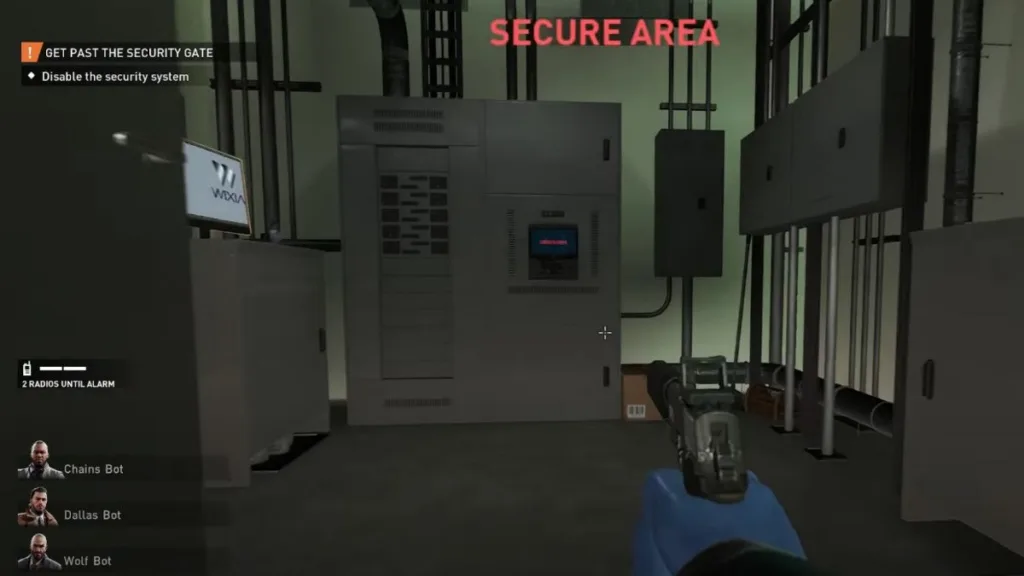
(Credit: PAYDAY 3)

Before diving into switch flipping, pinpoint the power room using these guidelines:

  • The power room can spawn in one of two locations: on the roof or on the second floor.
  • To access the power room, acquire the red keycard by searching guards on the first and second floors.
  • For a roof-based power room: Ascend the stairs from the inside, turn left, and then left again to locate it.
  • For a second-floor power room: Once on the second floor, turn right and then right again to reach the power room.

Unlock the power room with the red keycard and access the computer inside.

How to Flip the Right Switches in ‘No Rest for the Wicked’:

(Credit: PAYDAY 3)

Navigate the world of switches with precision:

  1. Access the laptop within the power room.
  2. Interact with the panel adjacent to the laptop, revealing a specific color: green, blue, white, or red.
  3. Memorize this color and proceed to the first floor.
  4. After descending the stairs, turn left to find the switch panel.
  5. Open the panel and deactivate the switch that matches the color you saw in the power room panel.

With the correct switch flipped, the door will unlock, granting access to the vault.

Conclusion: In summary, executing a stealthy heist in Payday 3’s ‘No Rest for the Wicked’ involves locating the power room, identifying the color from the power room panel, and flipping the corresponding switch on the first floor. Success in this heist relies on precision and discretion. Share your experiences and strategies in the comments section below.


Share this:

  • Share on Facebook (Opens in new window) Facebook
  • Share on X (Opens in new window) X

Like this:

Like Loading...

Related

Tags: No Rest for the Wicked heistPayday 3Payday 3 tips and tricksStealth GuideSwitch Flipping
Previous Post

October 2023 Brings Free Boosts and Energy with Anime Sword Simulator Codes”

Next Post

Grindstones: A Guide to Effective Weapon Maintenance in Lies of P

owaizkh

owaizkh

Next Post

Grindstones: A Guide to Effective Weapon Maintenance in Lies of P

Leave a ReplyCancel reply

Latest - Anime & Manga

Amazon introduces AI-made English dubbing for Banana Fish

Amazon introduces AI-made English dubbing for Banana Fish

December 1, 2025
New Girls Band Cry movie officially announced

New Girls Band Cry movie officially announced

September 24, 2025
DAN DA DAN Season 3

DAN DA DAN Season 3 Officially Announced

September 23, 2025

Jujutsu Kaisen Season 3 Trailer Confirms Split Release, Premieres January 2026

September 19, 2025
DAN DA DAN: Evil Eye Sets Early Fan Screening Dates in the Philippines

DAN DA DAN: Evil Eye Sets Early Fan Screening Dates in the Philippines

May 22, 2025
Takopi’s Original Sin Unveils Main Visual, Trailer, June 28 Release, and 6 Episodes Total

Takopi’s Original Sin Unveils Main Visual, Trailer, June 28 Release, and 6 Episodes Total

May 22, 2025
Console Chronicle

© 2026 JNews - Premium WordPress news & magazine theme by Jegtheme.

Navigate Site

  • Home
  • PC
  • PlayStation
  • Xbox
  • Nintendo Switch
  • Mobile
  • Esports
  • Anime and Manga

Follow Us

Welcome Back!

Login to your account below

Forgotten Password? Sign Up

Create New Account!

Fill the forms below to register

All fields are required. Log In

Retrieve your password

Please enter your username or email address to reset your password.

Log In

Add New Playlist

No Result
View All Result
  • Home
  • PC
  • PlayStation
  • Xbox
  • Nintendo Switch
  • Mobile
  • Esports
  • Anime and Manga

© 2026 JNews - Premium WordPress news & magazine theme by Jegtheme.

Discover more from Console Chronicle

Subscribe now to keep reading and get access to the full archive.

Continue reading


Loading Comments...
 

    %d

